~/writing/2016/08/22
satperf: A Satellite Performance benchmarking and automation tool
Originally published on heXoughts, my Octopress blog, in 2016. The Disqus thread came along with it.
1. Intro
Satperf (link) is a Red Hat Satellite Performance Benchmarking & Automation tool that makes it super easy to quickly setup your own environment with satellite components and start running workloads. It uses ansible playbooks to manage remote execution and has built-in modules for various roles that Satellite Web UI has to offer. These are carried out with the use of hammer commands (read more on Hammer) as an equivalent of Satellite API.
Briefly, it does the following activities:
- Satellite installation and monitoring
- uploads manifest, updates repo
- concurrently syncs multiple Repositories from Repo Server
- creates lifecycle environments
- creates capsules
- concurrently syncronizes multiple capsules
- ..etc
Satperf runs modules through ansible playbooks, briefly described below under ’Ansible Playbooks in Satperf` section.
2. Satperf setup
This is to get the satellite installation + monitoring tools up and running.
Although there’s a README included with the project, let’s briefly go through steps needed and get an install up and running.
It isn’t packaged right now, so first, clone this satperf repo.
2.a. PREREQUISITES
From project root, run: $ source ./setup, follow the output and act accordingly (install packages / activate virtualenv).
Ensure that satperf help command succeeds: $ ./satperf.py -h
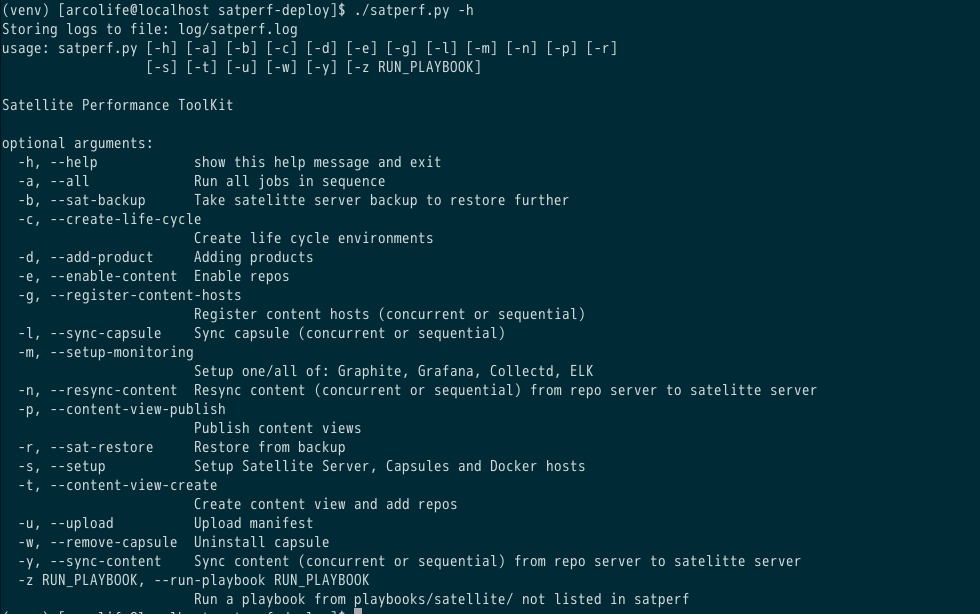
2.b CONFIGURATION
The above step should get the setup ready for configurations. Now, configure following files in the manner illustrated:
- Add configurations specific to Ansible
log_path = ~/ansible.log
private_key_file = ~/.ssh/id_rsa_perf- Add [FQDN / hostnames / IP Addresses] for your installation. Follow the ansible inventory file pattern, as shown by sample contents of this file.
[capsules]
x.x.x.x
[satellite6]
x.x.x.x
[graphite]
x.x.x.x
[grafana]
x.x.x.xconf/satperf.conf: Add configurations specific to satperf.
[Settings]
hosts = conf/hosts.ini
# satperf log file
log_file = log/satperf.log
# Logfile size in Bytes
log_file_size = 10000

[Monitoring]
# for collectd multi/single-host installations one/all of satellite6:capsules
# hosts = satellite6
hosts = satellite6:capsules
For now, leave the sections [RHN], [Satellite], [Pbench] untouched.
In this post, we’re only configuring satellite monitering module of satperf.
2.c SATELLITE INSTALLATION
If you already have the satellite setup running, skip below to ‘MONITORING INSTALLATION’.
Run $ ./satperf.py -s
You’d be asked the following, press [Enter] or type ‘n’ to skip, if the component’s already installed, or you don’t want it.
 =======> Installing Satellite..
Continue (y/n)?:

 =======> Installing Capsules..
Continue (y/n)?:
Ignore any other components shown in menu, if so.
Although we’ve tested this internally and it works, but since this is currently WIP, take a look at logs if something fails, or feel free to open an issue upstream.
2.c MONITORING INSTALLATION
Run $ ./satperf.py -m
You’d be asked the following, press [Enter] or type ‘n’ to skip, if the component’s already installed, or you don’t want it.
 =======> Installing Collectd..
Continue (y/n)?:

 =======> Installing Graphite..
Continue (y/n)?:

 =======> Installing Grafana..
Continue (y/n)?:
Although we’ve tested this internally and it works, but since this is currently WIP, take a look at logs if something fails, or feel free to open an issue upstream.
2.d FINAL STEPS (WIP)
Build the dashboards viewable, through Grafana, by running $ ./satperf.py -i
WIP status: facing an error in this step, similar to this one
Ansible Playbooks in Satperf
2 major categories:
-
Satellite
- Setup (either AWS or normal environements)
- Satellite
- Capsules
- Docker hosts (N content hosts per docker host)
- Satutils
- healthcheck
- Setup (either AWS or normal environements)
-
Monitoring
- Collectd
- Graphite
- Grafana
Playbook: Monitoring
For a description of metrics we collect about Satellite installation, refer to this post
Collectd: role description
Installs collectd on either/all of: satellite / capsule / docker-hosts
Graphite: role description
Installs Graphite time-series database for metric storage of collected metrics on the configured graphite host
Grafana: role description
Installs Grafana time-series metric visualization framework, on the configured grafana host
Playbook: Satellite
Setup: role description
- common
- rhsm
- setup
- pbench_client (WIP)
- satellite-populate
Satutils: role description (WIP)
- backup
- upload-manifest
- restore
- add-product
- create-lifecycle
- enable-content
- content-view-create
- content-view-publish
- content-view-promote
- sync-content
- sync-capsule
- register
- status_check
Health check: role description (WIP)
We plan to integrate this github project - sat6_healthCheck
Blog roll: More on Satellite itself
From Satellite’s latest release:
Red Hat Satellite 6.2 is now generally available, and includes the following major enhancements:
-
Enhanced container management with RHEL Atomic
-
New remote configuration management for managed hosts
-
bootstrap.sh support for configuration management and host migration
-
The ability to change disconnected environments to connected
-
Inter-Satellite synchronization for content
-
PXE-less discovery for existing systems